


How to Identify Single-Mode and Multimode Fiber Cable



Single-mode and multimode fiber cables can be identified by checking their jacket color, cable markings, core diameter, and connector color. The easiest method is to examine the cable jacket: single-mode fiber is typically yellow, while multimode fiber is commonly orange, aqua, or lime green. However, jacket colors alone are not always reliable, especially for outdoor cables. Checking the printed specifications is a more accurate way to identify the fiber type.
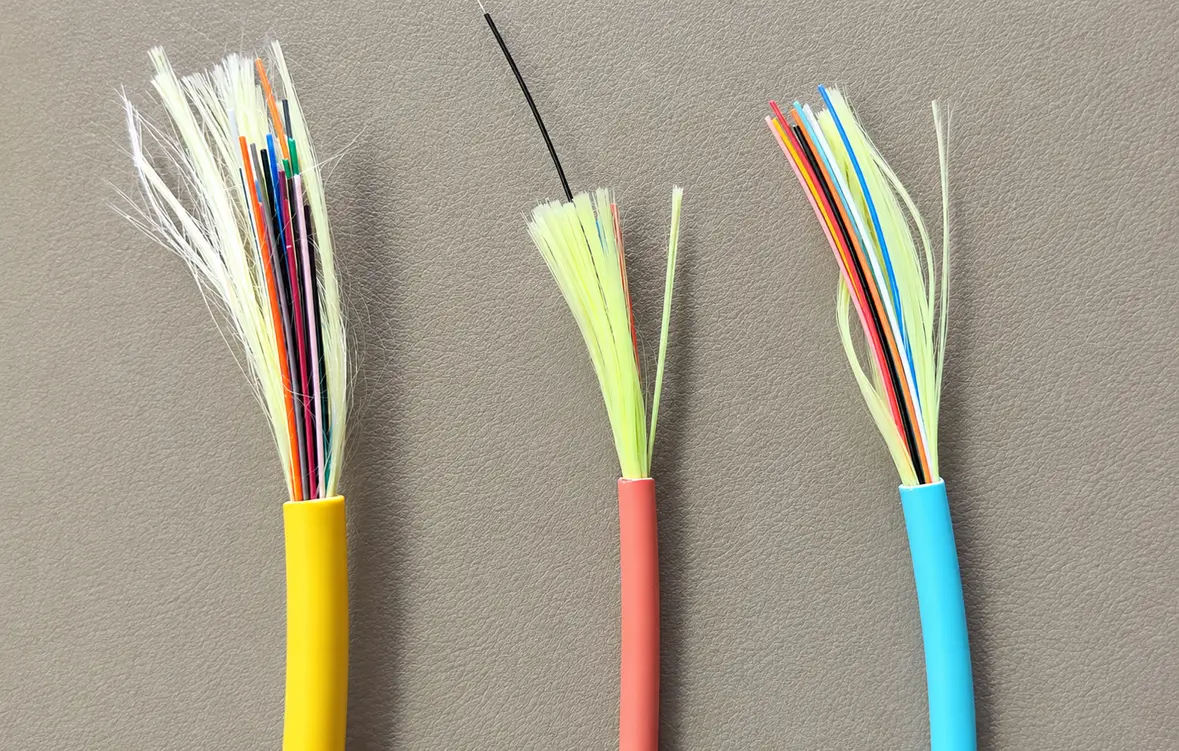
1. Check the Jacket Color of Fiber Cables
The jacket is usually one of the first indications of what type of fiber you deal with. Industry color codes help easily recognize single-mode and multimode fibers for indoor networks.
Some common jacket colors by the fiber type:
| Fiber Type | Common Jacket Color | Typical Application |
| Single-mode OS1/OS2 | Yellow | Long-distance communication |
| Multimode OM1 | Orange | Legacy LAN networks |
| Multimode OM2 | Orange | Short-distance data transmission |
| Multimode OM3 | Aqua | High-speed data centers |
| Multimode OM4 | Aqua or violet | High-performance data centers |
| Multimode OM5 | Lime green | Wideband multimode applications |
For most indoor purposes, the jacket color serves as a useful starting point. Yet, here are some caveats:
- The jackets of outdoor cables are usually black to withstand UV and environmental factors.
- Some manufacturers prefer to apply non-traditional jacket colors to customize the cables.
- OM4 cables may have an aqua or violet jacket depending on the market and manufacturer.
- Hybrid cables made of different fibers have non-standard jacket colors.
Therefore, it is better not to rely on jacket color only when identifying outdoor cables. Use the printed information in all cases.
2. Read the Information Printed on the Jacket
Examining the printed information on the cable jacket is the most reliable method to identify the type of fiber.
Most of the fiber-optic cables have printed specifications. The printed information usually contains the type of fiber, core and cladding diameter, the number of fibers, manufacturer’s name and date of manufacture.
Check the following descriptions:
Single-mode fiber:
- OS1
- OS2
- SM
- 9/125 μm
Multimode fiber:
- OM1
- OM2
- OM3
- OM4
- OM5
- 50/125 μm
- 62.5/125 μm
For example, if you see “OS2 9/125” on a cable jacket, it means that it is OS2 single-mode fiber. If you see “OM4 50/125” on a cable jacket, it means that it is a 50/125 μm multimode fiber.
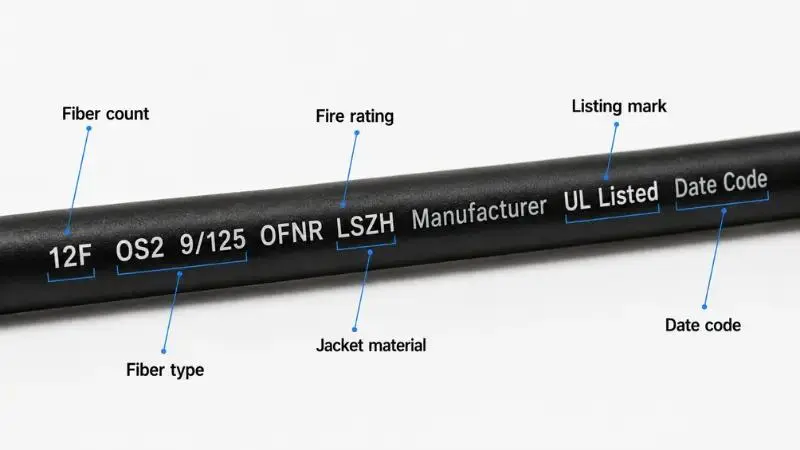
In practice, it is especially useful to check the printed information when installing several types of fiber cables in the same rack, cable tray, or telecommunications room.
3. Compare the Core Diameter of the Fibers
Yet another difference between single-mode and multimode is their core diameter.
Both single-mode and multimode fibers have different core diameters that affect light travel through the fiber.
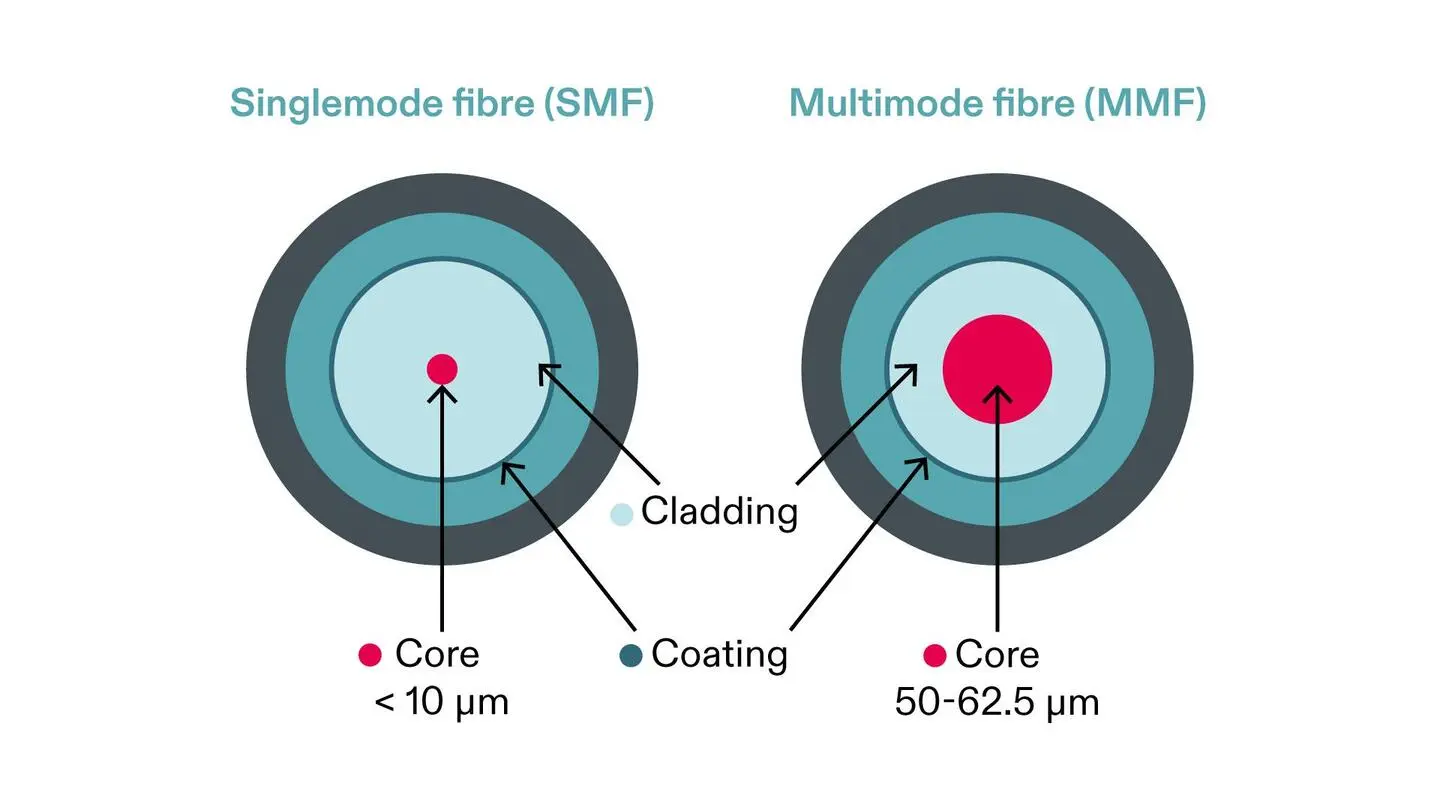
| Feature | Single-Mode Fiber | Multimode Fiber |
| Core diameter | Approximately 8–10 μm, commonly 9 μm | 50 μm or 62.5 μm |
| Cladding diameter | 125 μm | 125 μm |
| Light transmission | One propagation mode | Multiple propagation modes |
| Typical wavelengths | 1310 nm and 1550 nm | 850 nm and 1300 nm |
| Transmission distance | Long distance | Shorter distance |
| Common classifications | OS1, OS2 | OM1, OM2, OM3, OM4, OM5 |
The small core of the single-mode fiber allows traveling without modal dispersion. Thus, it is ideal for long-distance transmissions.
Multimode fiber has a large core that allows multiple light paths to travel through the fiber. Therefore, it is suitable for short connections such as data center networks and building communications systems.
It is important to understand that core diameter can not be identified based on the appearance of the cable only. For this, you will need an optical fiber inspection microscope or other suitable testing equipment.
4. Check the Connector Color
Connector colors can serve as an indication when identifying fiber patch cables.
Although LC, SC, ST, and FC are different connector types, the color of connector bodies and protective boots follows specific color conventions.
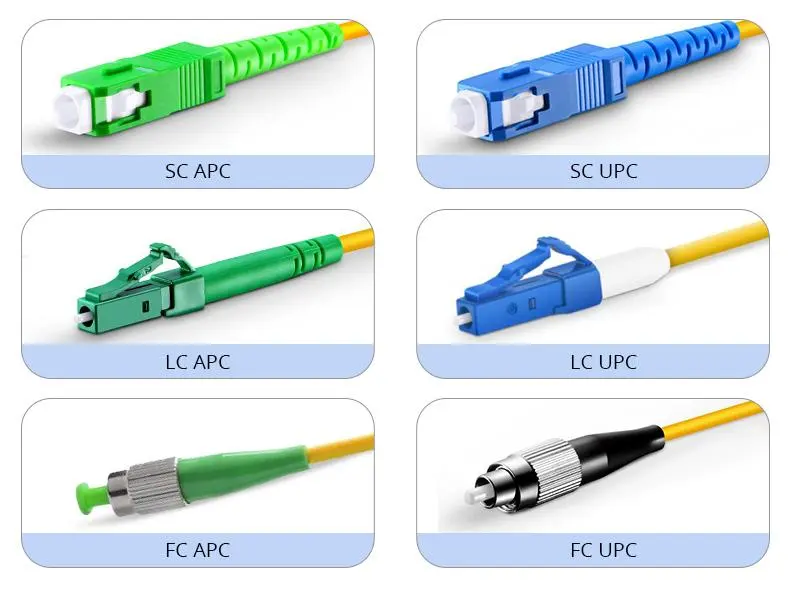
Some examples of color conventions for connectors are the following:
- Blue: usually, it indicates single-mode UPC connectors.
- Green: usually, it indicates single-mode APC connectors.
- Beige: usually, it indicates the old OM1 connections.
- Aqua: usually, it indicates OM3 and OM4 multimode connections.
- Lime green: usually, it indicates OM5 multimode connections.
However, connector colors are not a universal identification standard for all connectors and all manufacturers. For example, blue and green colors usually indicate the connector polishing type and not just single-mode fiber.
Thus, connector colors can be considered supporting information rather than identification proof.
5. Check the Fiber Type Using Optical Testing Equipment
When there is no information printed on the cable or the jacket color is ambiguous, optical testing equipment can help you identify the type of the fiber.
Some commonly used optical testing equipment by fiber-optic technicians is listed below.
Fiber inspection microscope
A fiber inspection microscope helps examine the end face of the fiber. Using the appropriate inspection tools, you will be able to inspect the core and cladding and measure their diameter.
Optical Time Domain Reflectometer (OTDR)
An OTDR sends optical pulses through the fiber and analyzes reflected signals. It is used primarily to measure the fiber length, attenuation, splice losses, and faults. In addition, it helps characterize an installed fiber link, yet it can not be used as a standalone visual fiber type identifier.
Optical Loss Test Set (OLTS)
An OLTS helps measure insertion loss across the fiber link. Selecting compatible light sources and testing equipment, you can evaluate the transmission performance of single-mode or multimode fiber installation.
If you are testing the unknown cable, first check its documentation and testing equipment specifications. Otherwise, you can obtain ambiguous results.
6. Why Is It Important to Know the Type of Fiber?
Choosing either single-mode or multimode fiber affects network performance, equipment compatibility, and costs of installation.
Some common differences in applications of single-mode and multimode fibers are listed below:
Single-mode fiber applications:
- Long-distance telecommunications networks
- Fiber-to-the-Home (FTTH) deployments
- Metropolitan area networks
- Long-distance backbone connections
- Data center interconnections
Multimode fiber applications:
- Short-distance data center connections
- Enterprise LAN infrastructure
- Connections between network switches and servers
- Building automation and communication networks
Also, transceivers have to match the type of fiber. Single-mode transceivers are made for single-mode fiber, and multimode ones are made for multimode fiber. Otherwise, the connection will not work.
For new long-distance telecommunications projects, the OS2 single-mode fiber is usually a practical solution. For short-distance data center connections, OM3 or OM4 multimode fiber can be used depending on the transmission speed, distance, and equipment requirements.
7. Quick Checklist to Identify Fiber Cable
If you need to distinguish single-mode and multimode fiber quickly, follow these steps:
- Check the jacket color: Yellow usually indicates single-mode; orange, aqua, and lime green usually indicate multimode.
- Read the cable markings: Look for OS1/OS2 or OM1–OM5.
- Check the core specifications: 9/125 μm generally indicates single-mode, while 50/125 μm or 62.5/125 μm indicates multimode.
- Examine the connector: Blue, green, beige, and aqua can provide additional clues.
- Use suitable testing equipment: Verify the fiber type when markings are unavailable or uncertain.
Conclusion
Identifying single-mode and multimode fiber cable is simple. The jacket color and printed information allow you to distinguish them quickly, and the core diameter and optical testing will help confirm it.
For network installers, telecom contractors, and equipment buyers, checking the fiber specifications before installation is critical. It will help avoid compatibility issues, shorten troubleshooting time, and guarantee that your cable satisfies transmission requirements.
Huijue Group provides fiber-optic cables and telecommunications infrastructure products for different applications. Choosing the correct fiber type, construction, and specifications is the key step to set up the reliable communication network.
 Hot Article

Founded in 2002, Huijue Networks is a high-tech service manufacturer integrating intelligent network communication equipment and an integrated application of computer intelligent network communication systems.
Set a Consultation Today